
Views: 222 Author: Robert Publish Time: 2026-01-14 Origin: Site


Content Menu
● What Is a Planetary Gearbox in SolidWorks?
● Design Goals for a SolidWorks Planetary Gearbox
● Core Components of the Planetary Gearbox Assembly
● Preparing to Build the Planetary Gearbox in SolidWorks
● Step 1: Create the Sun Gear Part
● Step 2: Create a Planet Gear Template
● Step 4: Design the Carrier for the Planetary Gearbox
● Step 5: Build the Shafts and Housing
● Step 6: Start the Planetary Gearbox Assembly
● Step 7: Position Gears with Sketches and Mates
● Step 8: Add Gear Mates for Working Motion
● Step 9: Constrain the Carrier and Ring
● Step 10: Create a Motion Study for the Planetary Gearbox
● Visual and Functional Refinement of the Model
● Using Configurations and Parametric Design
● Advanced Considerations: Multi‑Stage Planetary Gearbox
● Strength and Durability Checks
● Manufacturing and Assembly Optimization
● Using the Planetary Gearbox Model in Larger Systems
● Leveraging the Planetary Gearbox for Marketing and Training
● FAQ About Planetary Gearbox SolidWorks Modeling
>> 1. How many gears are in a typical planetary gearbox?
>> 2. Can a planetary gearbox be multi‑stage in SolidWorks?
>> 3. What is the best way to control tooth counts in a planetary gearbox model?
>> 4. How can interference in a planetary gearbox assembly be checked?
>> 5. Why is a planetary gearbox preferred over a simple parallel‑shaft gearbox in many machines?
A working planetary gearbox in SolidWorks is built by combining accurate gear models, a robust carrier, and precise mechanical mates so the gears rotate realistically under motion study. A well‑designed planetary gearbox in SolidWorks helps engineers validate torque transmission, compact packaging, and mounting details before manufacturing for machinery such as tracked undercarriages and winch drives.
A planetary gearbox in SolidWorks is a 3D CAD assembly that represents a sun gear, multiple planet gears, and an internal ring gear mounted inside a housing and connected by a carrier. In motion studies, this planetary gearbox assembly can simulate how input rotation at the sun or carrier produces reduced speed and higher torque at the output, similar to real industrial drives used by Kemer in tracked chassis, hydraulic winches, travel drives, and swing drives.
A planetary gearbox model usually contains a sun gear, 3 or more planet gears, an internal ring gear, a carrier, shafts, and a housing. In SolidWorks, these planetary gearbox parts can be created from scratch, imported from a gear library, or generated parametrically using equations to control gear data such as module, tooth count, and face width.

A planetary gearbox model in SolidWorks should be engineered to satisfy both kinematics and manufacturability. For industrial applications, the planetary gearbox needs to meet torque, ratio, efficiency, and installation envelope targets that match hydraulic motors and tracked undercarriage or winch systems.
Key goals when modeling a planetary gearbox include:
- Achieving the correct gear ratio and tooth counts for sun, planets, and ring.
- Maintaining center distances, backlash, and face widths to avoid interference in the planetary gearbox.
- Providing a strong carrier and shaft support so the planetary gearbox can be machined and assembled.
- Defining clear interfaces between the planetary gearbox, hydraulic motors, and output flanges for Kemer machinery.
A working planetary gearbox in SolidWorks is built from a coordinated set of 3D parts. These parts must align so that the planetary gearbox meshes correctly under motion and reflects how torque is shared.
Main planetary gearbox components:
- Sun gear: The central gear driven by the motor or input shaft.
- Planet gears: Several identical gears that orbit around the sun gear in the planetary gearbox.
- Ring gear: An internal gear with teeth facing inward, enclosing the planet gears.
- Carrier: A rigid structure that supports the planet gear shafts and often acts as the output of the planetary gearbox.
- Shafts and bearings: Support the sun, carrier, and sometimes the ring gear within the housing.
- Housing and covers: Enclose and protect the planetary gearbox while providing mounting points and sealing surfaces.
Before starting SolidWorks, define essential planetary gearbox parameters in a spreadsheet or design brief. These values guide every part of the planetary gearbox model.
Typical planetary gearbox planning data:
- Required reduction ratio, such as 5:1, 10:1, or 25:1 depending on the machine.
- Tooth counts for sun, planets, and ring; for a simple planetary gearbox, ring teeth often equal sun teeth plus two times planet teeth.
- Gear module or diametral pitch and pressure angle for spur gears in the planetary gearbox.
- Gear face width and material, which influence torque capacity and durability.
- Overall diameter and axial length limits for the planetary gearbox housing in the target machine.
The sun gear is the heart of the planetary gearbox and is often modeled first in SolidWorks. A robust sun gear model supports accurate meshing with planets and proper shaft connection in the planetary gearbox.
Modeling guidelines for the sun gear:
- Define gear parameters such as module, tooth count, and pressure angle as global variables so the planetary gearbox can be scaled later.
- Sketch a gear blank as concentric circles, then build an involute tooth profile and pattern it around the sun gear using circular patterns.
- Add a hub, keyway, spline, or bolt pattern for coupling the planetary gearbox sun gear to the motor shaft or input flange.
Planet gears in a planetary gearbox are typically identical copies to balance load around the sun. Creating one detailed planet gear part and reusing it in the assembly maintains consistency.
Planet gear modeling points:
- Use the same module and pressure angle as the sun gear but adjust the tooth count to match the planetary gearbox ratio.
- Model the gear teeth using an involute profile or gear generator method and ensure proper bore diameter for the planet shafts.
- Add chamfers or fillets to the tooth edges for realistic contact conditions within the planetary gearbox and to simplify manufacturing.
The ring gear is the large internal gear that surrounds the planet gears in the planetary gearbox. In SolidWorks, this part is modeled as a ring‑shaped body with internal spur teeth.
Ring gear modeling strategy:
- Choose an outer diameter that fits inside the machine envelope while leaving room for sufficient tooth height and housing thickness in the planetary gearbox.
- Construct the internal tooth profile to match the planet gears and ensure correct center distance between sun and ring.
- Integrate mounting holes, flanges, or bolt circles so the ring gear can be fixed to the planetary gearbox housing or allowed to rotate, depending on the configuration.
The carrier connects all planet gears and often serves as the output member of the planetary gearbox. A well‑designed carrier ensures structural strength and alignment of the planet gears.
Carrier design features:
- A central boss or hub that attaches to the output shaft, sprocket flange, or winch drum of the planetary gearbox.
- Radially spaced arms or discs with through‑holes or bosses for planet gear shafts, located precisely on the pitch circle.
- Generous fillets around arms and hubs to manage stress in the planetary gearbox when transmitting high torque.
- Optional light‑weighting cutouts if the planetary gearbox must minimize mass without sacrificing rigidity.
A complete planetary gearbox must include realistic shafts and housing components. These elements provide context and validate how the planetary gearbox will be mounted in a real application.
Key housing and shaft considerations:
- Input shaft sized for motor torque and bearing selection, integrated with the sun gear or coupled to it.
- Output shaft or flange integrated with the carrier or ring gear, depending on planetary gearbox layout.
- Bearings, snap ring grooves, and shoulders that locate the rotating members precisely.
- Cylindrical or prismatic housing with bolt patterns, inspection covers, and sealing surfaces for oil‑filled planetary gearbox designs.
Once core parts are ready, start a new assembly representing the planetary gearbox. This is where SolidWorks mates define relationships among components.
Basic planetary gearbox assembly workflow:
- Insert the ring gear first and fix it as the initial reference component.
- Add the sun gear, planet gears, carrier, shafts, bearings, and housing into the same assembly.
- Apply concentric mates between each gear bore and its shaft, and coincident mates between key faces to ensure proper axial alignment in the planetary gearbox.
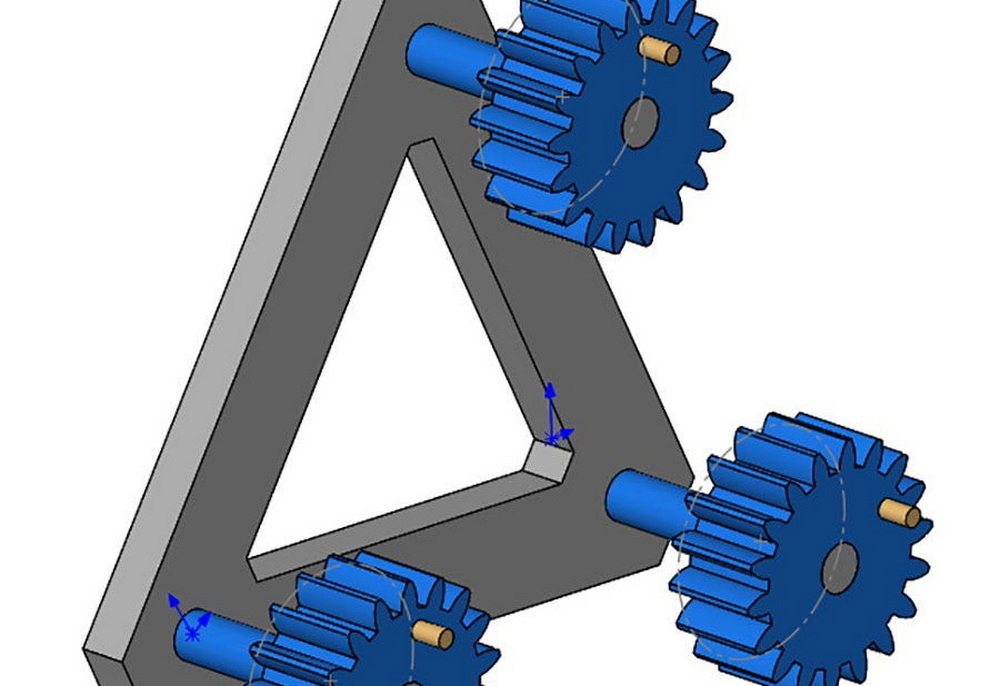
Accurate positioning ensures the planetary gearbox gears share correct center distances and mesh line‑to‑line without interference. Construction sketches can guide this layout.
Typical constraints for planetary gearbox positioning:
- Create a reference sketch at the assembly level with circles representing the pitch circles of sun and planets.
- Place planet gear shafts on a pitch circle around the sun and use concentric mates between shafts and this sketch geometry.
- Adjust planet gear position by fine‑tuning tooth counts and module, then confirm that all gears in the planetary gearbox mesh smoothly.
Mechanical gear mates link rotational velocities according to tooth counts and ensure the planetary gearbox moves realistically when driven.
Gear mate setup for a planetary gearbox:
- Add a gear mate between sun gear and each planet gear, entering tooth numbers for both.
- Add a gear mate between each planet gear and the ring gear, taking into account that one is internal and the other external in the planetary gearbox.
- Make sure only necessary gear mates are applied; redundant constraints can over‑define the planetary gearbox assembly and prevent motion.
Different planetary gearbox modes arise from fixing one member and driving another. SolidWorks constraints allow these modes to be modeled and compared.
Common planetary gearbox configurations:
- Fixed ring, driven sun, output carrier: produces classic speed reduction and torque multiplication.
- Fixed sun, driven ring, output carrier: yields a different reduction and torque characteristic.
- Fixed carrier, driven sun, output ring: gives a faster output with unique planetary gearbox behavior.
In practice:
- Fix the selected component (often the ring) relative to the housing using a standard mate or fixing command.
- Apply a rotary motor feature to the input shaft or gear.
- Leave the output member free to rotate and monitor its angular speed and torque reactions in the planetary gearbox.
A motion study validates whether the planetary gearbox mates are correct and displays how power flows through the gears.
Basic motion study steps:
- Open a new motion study and choose a motion type appropriate for gear contact and rigid‑body motion.
- Add a rotational motor to the input member, for example the sun gear, at a specific speed.
- Run the analysis and watch the planets revolve around the sun while spinning on their axes and engaging the ring gear.
- Inspect rotation directions and speeds to ensure the planetary gearbox behaves as expected for the target ratio.
After the planetary gearbox moves correctly, refine aesthetics and detail to match real‑world hardware. This helps technical communication and marketing.
Refinement techniques:
- Assign different appearances or colors to sun, planets, ring, carrier, shafts, and housing so the planetary gearbox internals are easy to understand.
- Add fillets, chamfers, and realistic edge breaks to reduce stress concentration and reflect standard machining practices.
- Create exploded views showing assembly sequences of the planetary gearbox, including order of inserting planet gears, shafts, and carrier.
Parametric methods allow one SolidWorks model to represent an entire series of planetary gearbox options. This is especially useful for Kemer, which may offer multiple ratios and torque ratings.
Configuration strategies:
- Tie gear diameters, tooth counts, and face widths to global variables or equations that can be changed for each planetary gearbox variant.
- Use configuration‑specific dimensions for housing thickness, flange diameters, and carrier geometry.
- Build design tables listing each planetary gearbox size, ratio, and key parameters so engineers can switch between models quickly.
Many heavy‑duty drives use more than one stage to reach very high ratios while keeping the planetary gearbox compact. SolidWorks can represent these multi‑stage systems.
Multi‑stage planetary gearbox ideas:
- Stack two planetary sets in series inside one extended housing, with the carrier of the first stage driving the sun of the second.
- Reuse the same planet and ring geometry where possible to simplify manufacturing and reduce cost.
- Use separate configurations for single‑stage and multi‑stage versions of the planetary gearbox while sharing core parts.
While SolidWorks is primarily a modeling tool, it can support strength checks for the planetary gearbox with additional analysis modules.
Typical checks for a planetary gearbox:
- Basic interference detection to ensure gears and carriers never collide under motion.
- Contact visualization between gears to verify proper overlap and load sharing.
- Preliminary finite element analysis on carrier arms or ring gear segments to check that maximum stresses stay within material limits.
- Bearing and shaft reaction force estimation to choose appropriate bearings for the planetary gearbox.
Translating the CAD model into a practical planetary gearbox requires attention to manufacturability and assembly workflow.
Practical optimization tips:
- Simplify overly intricate cosmetic features that complicate machining but add little value to the planetary gearbox performance.
- Standardize bores, keyways, and bolt circles so multiple planetary gearbox sizes can share common components.
- Plan assembly order using exploded views and check that tools have access to fasteners and shafts inside the planetary gearbox.
Once the planetary gearbox assembly is complete and validated, it becomes a module inside a larger machine model. This integration is crucial for real‑world applications.
Integration scenarios:
- In a tracked undercarriage, mount the planetary gearbox between hydraulic motor and drive sprocket, verifying alignment and clearance.
- In a hydraulic winch drive, position the planetary gearbox between motor and drum, ensuring the gearbox can withstand shock loads.
- In swing drives, connect the planetary gearbox output to a slew ring or swing bearing and confirm that torque reactions are safely managed.
A clean, animated planetary gearbox model is a powerful tool for sales, technical marketing, and service training.
Usage examples:
- Animated rotation sequences that reveal how the planetary gearbox divides torque among planets.
- Cutaway and section views used in brochures and online content to showcase the compact design of Kemer planetary gearbox solutions.
- Training materials for technicians demonstrating disassembly and reassembly steps of the planetary gearbox.
Building a working planetary gearbox in SolidWorks starts with clear design requirements and carefully chosen gear parameters. By modeling the sun, planet, and ring gears accurately, designing a strong carrier, and adding correct gear mates, engineers can create a planetary gearbox assembly that moves realistically and reflects real‑world torque and speed relationships. Parametric control and configurations then turn a single model into an entire family of planetary gearbox options suited to different machines and duty cycles. When integrated into undercarriages, winch drives, travel drives, swing drives, and hydraulic motor systems, a well‑designed planetary gearbox from Kemer delivers compact, reliable power transmission for demanding global applications.
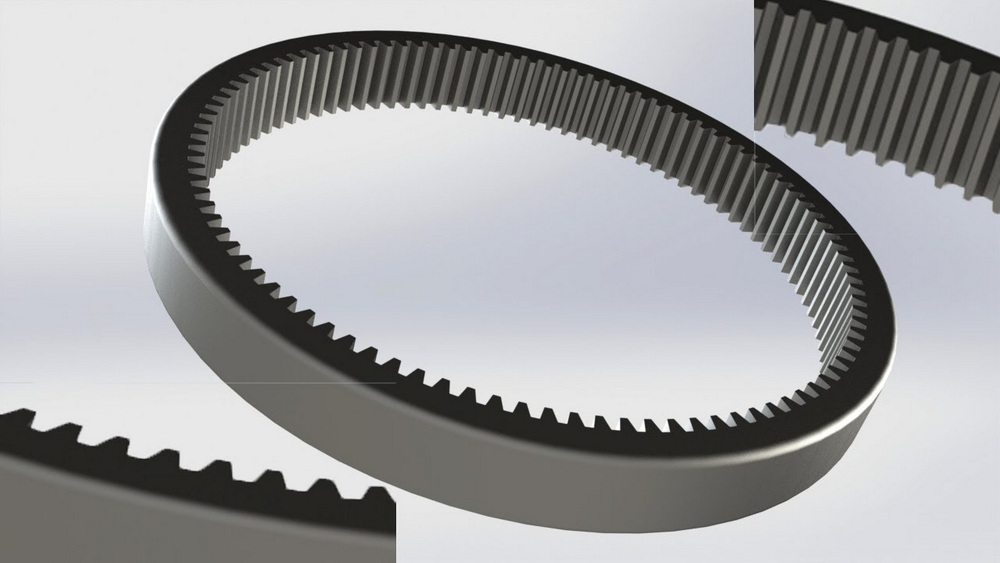
A simple planetary gearbox usually contains one sun gear, one ring gear, and three or more identical planet gears mounted on a carrier. Some heavy‑duty planetary gearbox designs can use four or even five planets to spread load more evenly and increase torque capacity without increasing overall diameter.
Yes, SolidWorks can represent single‑stage and multi‑stage planetary gearbox designs within one model or assembly. By stacking stages, where the output of one planetary gearbox stage becomes the input of another, engineers can achieve very high reduction ratios while keeping the overall drive compact for tracked vehicles, winches, and swing drives.
The most robust approach is to link tooth counts and module to global variables or equations so that every gear in the planetary gearbox updates consistently. When the sun gear tooth count is adjusted, dependent equations can automatically recalculate planet and ring gear values, preserving center distances and accurate meshing throughout the planetary gearbox assembly.
Interference can be checked by running interference detection on the full planetary gearbox assembly while stepping through motion or using a motion study. Any collisions between sun, planets, ring, carrier, or housing highlight where clearances, backlash, or chamfers must be adjusted to ensure the planetary gearbox runs smoothly and avoids damage under load.
A planetary gearbox offers high torque density and coaxial alignment of input and output, delivering strong reduction in a very compact package. Because the load is shared among multiple planets, the planetary gearbox handles shock loads and uneven stresses better than many parallel‑shaft designs, making it ideal for demanding Kemer applications such as tracked chassis, hydraulic winches, travel drives, and swing drives.


